Convert PNG / JPG to SVG Vectors
VectorKit uses AI technology to convert your images into scalable SVG vectors, maintaining clarity while reducing file size.
Drag and drop your image or click to upload
Supports PNG and JPG formats, maximum file size is 10MB
Three simple steps for quick conversion
Upload Image
Drag and drop or select the PNG or JPG image you want to convert
AI Processing
Our AI algorithm automatically processes your image, usually in just a few seconds
Download SVG
Once conversion is complete, download the SVG file immediately or proceed with further editing
Conversion Results
Drag the slider to view the comparison effect between PNG and SVG

SVG vector graphics remain clear at any size
Advanced Vector Conversion Technology
VectorKit uses cutting-edge algorithms to convert your bitmap images into high-quality vector graphics, offering unmatched precision and control.
Path Smoothing
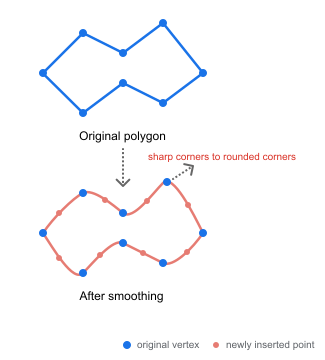
Our algorithm employs an enhanced 4-point subdivision scheme to smooth paths while preserving shape fidelity. This approach avoids jagged edges and unnatural angles common in traditional vectorization.
Technical Details
Our path smoothing algorithm generates smoother curves through intelligent subdivision while preserving key points. Unlike traditional 4-point schemes, our method identifies and retains critical corner points, ensuring the graphic's features remain intact.
Technology Comparison
Comparison of VectorKit with other vector conversion tools
| Features | VectorKit | Traditional Vector Tools | Online Converters |
|---|---|---|---|
| Intelligent Path Smoothing | Advanced | Basic | Limited |
| Color Quantization Precision | High Precision | Medium | Low |
| Processing Complex Images | Excellent | Good | Poor |
| Detail Preservation Ability | High | Medium | Low |
| File Size Optimization | Up to 70% | 30-50% | 10-30% |
| Conversion Speed | Fast | Slow | Medium |
| Batch Processing | Supported | Limited Support | Not Supported |
| Post-Edit Friendliness | Very Friendly | Average | Poor |
Powerful Features
High-Precision Conversion
AI algorithm precisely identifies lines and shapes in the image, preserving the original image details
Layer Separation
Automatically breaks down the image into different layers for easy editing and customization
Editable Graphics
Built-in vector graphics editor that allows you to edit graphics directly online and download them after editing
Simple and Transparent Pricing
Free
For first-time users
- 20 Free Conversions
- Maximum File Size 1MB
- Basic Conversion Quality
Basic
For professional designers and small teams
- 400 Conversions Per Month
- Maximum File Size 5MB
- High Quality Conversion
- Email Support
Pro
For large teams and enterprises
- 800 Conversions Per Month
- Maximum File Size 10MB
- High Quality Conversion
- Email Support
Frequently Asked Questions
Frequently asked questions about VectorKit and image conversion to SVG